
The workshop is next week, and the calendar invitation says "joint discussion". The person running it wonders whether to bring a flip chart and sticky notes, open a Miro board, or whether a Teams poll will do. The choice is often made based on which tool is familiar, although a better question would be what the tool needs to do in this session.
This page compares four groups of facilitation tools: flip charts and sticky notes, digital whiteboards, polling and survey tools, and conversation cards. For each one we cover what it suits, where it falls short and in what kind of situation it is worth choosing. The basics of facilitation, the methods and a one-hour structure are covered separately in the guide facilitation: what it means and how to facilitate successfully.
What should a facilitation tool do?
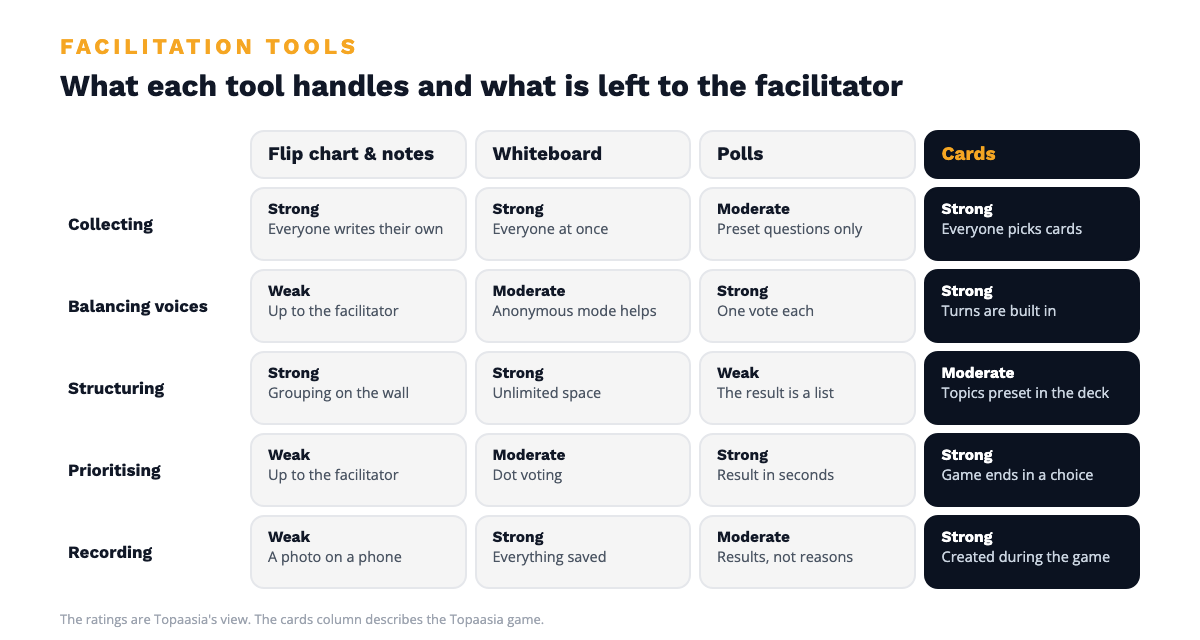
A tool does not facilitate on anyone's behalf, but it can take over part of the facilitator's work. A good conversation has five tasks, and tools are worth comparing by how many of them they handle.
- Collecting thoughts. Everyone gets their own thought visible before the first speaker sets the direction.
- Balancing voices. The quiet ones get heard, and the most talkative do not fill the whole space.
- Structuring. Thoughts are grouped so that the whole picture takes shape.
- Prioritising. Out of many topics, the group chooses the one that something will be done about.
- Recording. The outcome is saved after the session without anyone writing up minutes in the evening.
Most tools are strong in one or two of these tasks. That is why an experienced facilitator combines them, and why a first-timer should choose a tool that carries as many of the tasks as possible ready-made.
Flip chart and sticky notes
A flip chart, markers and sticky notes are the basic equipment of facilitation, and they can be found in almost every meeting room.
Where they are good. Sticky notes are excellent for collecting and structuring thoughts. Everyone writes for themselves, the notes can be moved around on the wall, and the grouping is done together by hand. There is nothing to set up, and nobody needs to learn anything. In a face-to-face session, a wall full of notes also creates the feeling that something was achieved.
Where they fall short. Sticky notes do not balance voices or prioritise, so those are left to the facilitator. The flip chart easily ends up in the handwriting of whoever stands next to it. Recording is the weakest point, because the notes get photographed and the picture stays on someone's phone. Remotely and in hybrid sessions the equipment does not work at all.
With sticky notes, the facilitator's workload also comes as a surprise. Samuli Kiviniemi from Sanoma Media Finland has run more than 500 retrospectives and used sticky notes a lot before Topaasia, and he describes two things that take time. The first is preparation: "In the post-its, you have to come up with a new, different way to arouse thoughts in people every time, and you have to do a lot of work to achieve that." The second is the grouping in the session itself, when similar notes are gathered together, the groups are given names and then voted on.
When to choose. A flip chart and sticky notes suit face-to-face ideation and structuring, when the facilitator has experience and someone has agreed to write up the results afterwards.
Digital whiteboards
Miro, Mural, FigJam and Microsoft Whiteboard move the wall of notes into the browser. The principle is the same as with a flip chart, but the space is unlimited and everything stays saved.
Where they are good. Whiteboards are at their strongest in collecting, structuring and recording. Everyone writes at the same time, the anonymous mode lowers the threshold, and ready-made templates speed up planning. Most also have dot voting for prioritising. In remote and hybrid sessions a whiteboard is a natural choice, because everyone works from their own screen.
Where they fall short. An empty board does not tell anyone what to write on it. The questions, stages and use of time are still for the facilitator to plan, and building a good board easily takes more time than the session itself. For some participants the tool is unfamiliar, so the first quarter of an hour goes into learning it. The board also fills up just as easily as a flip chart, and from a wall of two hundred notes it is hard to see what people agreed on.
When to choose. A whiteboard suits planning and ideation held remotely or in hybrid, when the facilitator has time to build the board in advance and the group uses the tool repeatedly.
Polling and survey tools
Mentimeter, Slido and the built-in polls of Teams or Zoom are made for collecting opinions quickly. The participant answers on their phone, and the result is immediately visible to everyone.
Where they are good. Polling tools balance voices and prioritise more effectively than any other group. Everyone has one vote, the answers are anonymous, and in a session of a hundred people the result is ready in half a minute. Word clouds and scales work well as session openers.
Where they fall short. A poll tells you what the group thinks, but it does not tell you why. The result is the start of a conversation, and if no time or structure has been reserved for that conversation, what is left of the session is a bar chart. The questions have to be worded in advance, so the topics are still chosen by the facilitator.
When to choose. A polling tool suits a large session, a quick snapshot and prioritising alongside another tool.
Conversation cards
In conversation cards the structure is built into the tool. In the deck, each card is one topic or perspective. Everyone chooses their own cards before anyone speaks, presents them in turn, and finally the group chooses the most important one and agrees what will be done about it.
Topaasia is a tool like this. It works as a physical deck around a table and as a digital game remotely, in which case everyone picks their cards on their own phone and the game master steers the round from their own computer. A session takes an hour, and the documentation is created during the game.
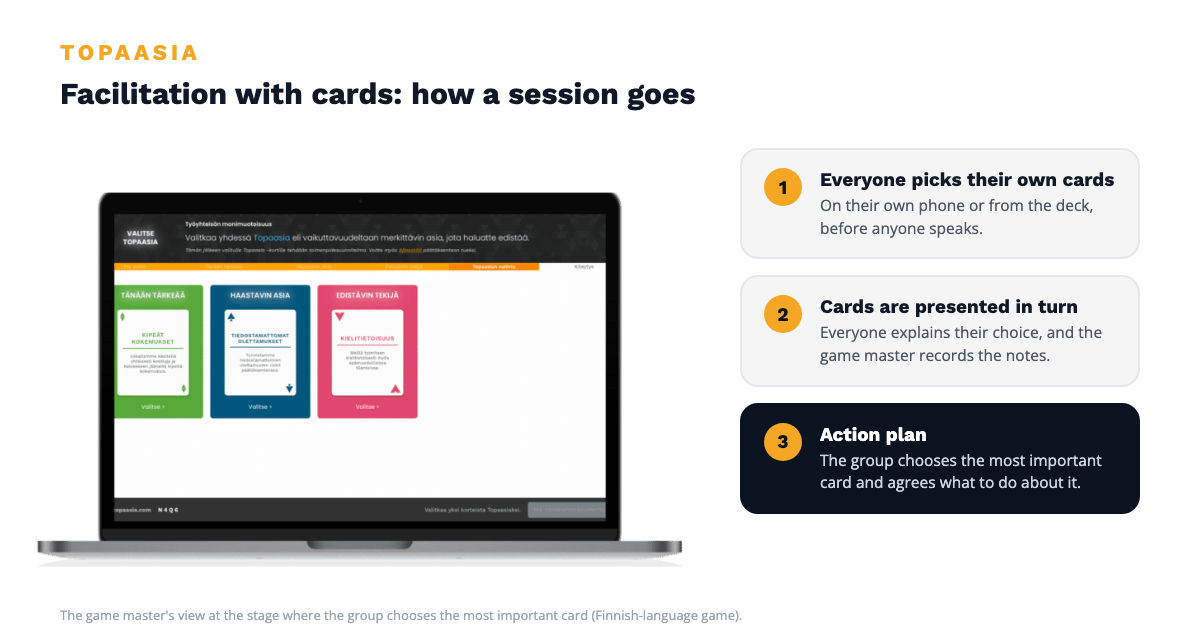
Where they are good. Cards handle all five tasks. Choosing the cards collects the thoughts, the turns balance the voices, the cards structure the topics ready-made, the game ends in one choice, and the record is created along the way. The facilitator does not need to plan questions or stages, so preparation takes a few minutes. Professional coach JP Jakonen describes his experience like this:
"The game brings lightness to the discussion when fairly challenging matters are being handled in facilitated group discussions."
Jakonen's full experience can be read in the article group discussions efficiently and simply.
Samuli Kiviniemi has used both sticky notes and cards at Sanoma, and his comparison is direct: with cards the team gets to the heart of the conversation considerably faster than with sticky notes, because no time goes into grouping and coordination. According to him, nothing has been left unsaid by the participants, even though they have not written the cards themselves. A familiar structure gives the participants confidence, and variation comes from changing the deck or the perspectives. Kiviniemi sums up the benefit like this:
"The main benefit is a quick discussion of the right things at that very moment."
At Sanoma the cards have been used with sales, marketing, software development and project managers, in recurring continuous improvement workshops, in unpacking the lessons of finished projects and in working through the results of job satisfaction surveys. The whole interview can be read in Sanoma's customer story.
Where they fall short. Cards do not suit free ideation where completely new thoughts are sought, because the topics in the deck have been chosen in advance. They also do not suit visual design, such as drawing a process chart or a service path. One game works best in a small group, so in a large session the participants are divided across several tables or games.
When to choose. Cards suit a conversation that needs to end in shared understanding and a decision: team development, a retrospective, working through strategy or unpacking the results of an employee survey. They are especially suitable when the person running the session is a manager and not a professional facilitator. How card-based dialogue works with teams is described in the article conversation cards for teams.
How to choose a tool for the situation
Choosing a tool gets easier when you start from the goal of the session.
- You are looking for new ideas. Choose sticky notes face to face or a whiteboard remotely, and reserve a vote for the end so that something gets chosen from the ideas.
- You want a quick snapshot from a large crowd. Choose a polling tool, and agree in advance where the results will be discussed.
- The team needs to talk about a difficult topic. Choose cards, because choosing a card is easier than being the first to say something out loud. More on the topic in the article psychological safety at work.
- The conversation needs to end in a decision. Choose a tool that includes prioritising and recording, or reserve the last twenty minutes for them.
- The facilitator is doing this for the first time. Choose a tool that carries the structure ready-made, so that the facilitator can concentrate on listening.
- The same conversation recurs regularly. A retrospective, for example, is worth building on a tool that does not need to be planned again every time.
Whichever tool you choose, try it yourself first. Kiviniemi's advice for adopting a new tool is to run the first session for yourself and take part in it on your own phone, because then you know what the participants see and can guide them.
Tools can also be combined. Many facilitators open the session with a poll, hold the actual conversation with cards and gather the follow-up work on a whiteboard.
Frequently asked questions about facilitation tools
What facilitation tools are there?
Facilitation tools fall into four groups: flip chart and sticky notes, digital whiteboards such as Miro and Mural, polling and survey tools such as Mentimeter and Slido, and conversation cards such as Topaasia. In addition there are ready-made structures and canvases that are used on top of these.
What is the best tool for remote facilitation?
The best tool depends on the goal. A digital whiteboard suits ideation and planning, and a digital card game that includes turns and recording suits a conversation that needs to end in a decision. Running a remote session is covered in the article run an effective remote workshop easily.
Does facilitation always need a tool?
Facilitation works without a tool too, if the facilitator can keep the structure in their head. A tool is most useful when the facilitator is part of the team, when the group has both talkative and quiet people, or when the outcome has to be documented.
Are conversation cards suitable for a professional facilitator?
Conversation cards suit professionals as well, and many coaches and consultants use Topaasia in their own client work. The cards free up preparation time and give the group a shared language, and the facilitator's professional skill shows in the follow-up questions. How Topaasia is used in team development is described on the team development page.
Choose the tool by what needs to come out of the conversation
Each of these tools is good at what it was made for. Sticky notes and whiteboards produce ideas, a poll produces a snapshot, and cards produce a conversation that ends in a decision. The choice is worth making by the outcome and not by which tool happens to be open.
If you want to try what facilitation feels like when the structure is ready, the free 30-day trial does not commit you to anything. If you want to see how Topaasia would work in your organisation, book a demo. More than 35,000 people have taken part in Topaasia sessions, and they have rated them 4.2 out of 5.